
Introducing AlcancaBot

Your AI operators that get things done

Persistent teammates on a computer that stays on. They take the work through your tools, keep each other in context, and bring you in only when judgement is required.

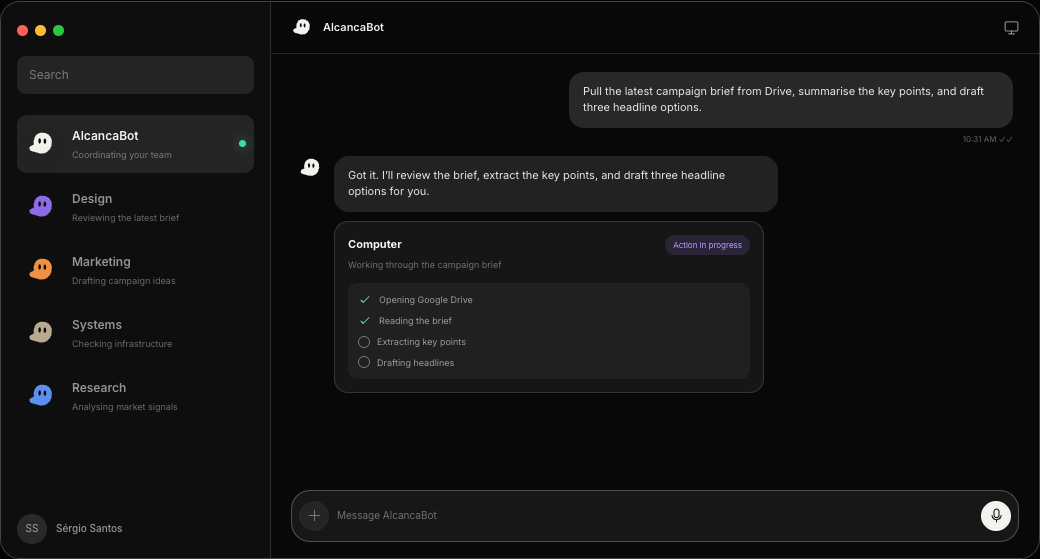
AlcancaBot desktop workspace with operators, a live computer job, and a campaign brief in progress
AlcancaBot on macOS. One workspace, a Host computer, and operators that keep the job moving.

What it is for

Take the operating load off your plate

AlcancaBot is built for people who already run a company. You keep strategy, taste and the last yes. The Host keeps the browser session, the files and the unfinished work, so the team of operators can finish the job instead of drafting another reply.

Persistent Host

A computer that keeps working after you close the app

Every workspace has a Host. It holds the browser, files and tools your operators need. Work is queued there, so runs continue while you are in a meeting, asleep, or offline.

HostLive
Computer
Shared workspace Host
Browser
Signed in, session held
Queue
3 jobs running · 1 waiting
Last handoff
Campaign brief extracted
  1. Drive brief opened
  2. Key points extracted
  3. Headline options in draft
  4. Waiting for your review

Briefing

Hand off work the way you brief a colleague

You write what needs to happen. AlcancaBot keeps the thread, the files and the decisions attached to that job. It does not restart from a blank chat every morning.

Take the Q3 outbound list, keep only construction firms in Texas, and draft the first wave in our voice. Stop before send.

18 accounts match. First-wave copy is in the workspace. Nothing has been sent.

I will hold here until you approve the list.

Control

You stay on the actions that leave the building

Drafts, sends, deployments and purchases wait for you. Review what ran, what is planned, and what needs a yes. The audit trail stays in the workspace.

Needs you2 waiting
  • Send first-wave emailSales · 18 recipients
    ReviewHold
  • Publish weekly updateChief of Staff · Notion
    ReviewHold

Specialists

A desk of operators, not one generic assistant

Give sales, research, systems and marketing their own seat. They work in parallel, pass context, and AlcancaBot keeps the coordination readable.

AlcancaBotCoordination
Briefing Systems
SalesOutbound
List ready
ResearchMarket
Reading filings
SystemsInfrastructure
Health check

Memory

It gets sharper on your company, not the internet

Goals, voice, stakeholders and the rules you stated once stay attached to the workspace. Next week starts from that, not from a prompt you have to paste again.

Workspace memory
  • Voice: direct, no filler, no hype
  • Q3 goal: 18 qualified first calls
  • Dana approves annual contracts
  • Never send before a human pass

Tools

It works in the software you already run

Connect Drive, mail, the repo, the CRM and the browser. If a job needs a step that does not exist yet, plugins extend the Host instead of sending you back to copy-paste.

DriveMailCalendarGitCRMBrowserSlackSheets

In the room

Built for operators who already have a company to run

AlcancaBot sits beside the people doing the work, not on a separate AI island. The desktop app is the briefing surface. The Host is where the work actually happens.

Get the macOS app
Operators working at separate desks in a dark studio

Private beta

Early access while the product is still sharp

macOS first. One Host per workspace. Operators that remember how you work.

Individual

For a founder or operator running the company from one desk.

  • One shared Host on your computer
  • Persistent operators with workspace memory
  • Routines for recurring jobs
  • Plugins to extend the Host
  • Desktop on macOS
Request access

Team

For a small group that already shares tools, files and judgement.

  • Shared Host with team access
  • Operators that persist across the team
  • Routines for shared workflows
  • Plugins to extend the Host
  • Desktop on macOS
Talk to us

Questions

Before you request access

A chatbot answers in the window you have open. AlcancaBot is a workspace of operators on a Host computer. They use your tools, keep memory, run in parallel, and continue after you close the desktop app.

Yes. Jobs are queued and executed by the workspace Host, so runs keep going and are waiting when you come back.

In the private beta, each workspace uses one shared Host. All operators can use its files, browser and tools. Graphical control is coordinated so they do not fight over the same screen.

Anything that leaves the workspace: outbound mail, publishes, purchases, and similar actions. You can allow once, always allow, or refuse. The trail of what ran stays visible.

Chats live in the AlcancaBot workspace. Operational memory and credentials stay behind the product infrastructure. They are never shipped inside the desktop app.

Individuals and small teams who already run real work: outbound, operations, research, engineering. macOS first. iOS follows later.

Put AlcancaBot on the work

Keep the judgement. Hand off the rest.

DownloadRequest private beta